
How to Fix Weak Wi-Fi Signals & Slow Speed at Home (2026)
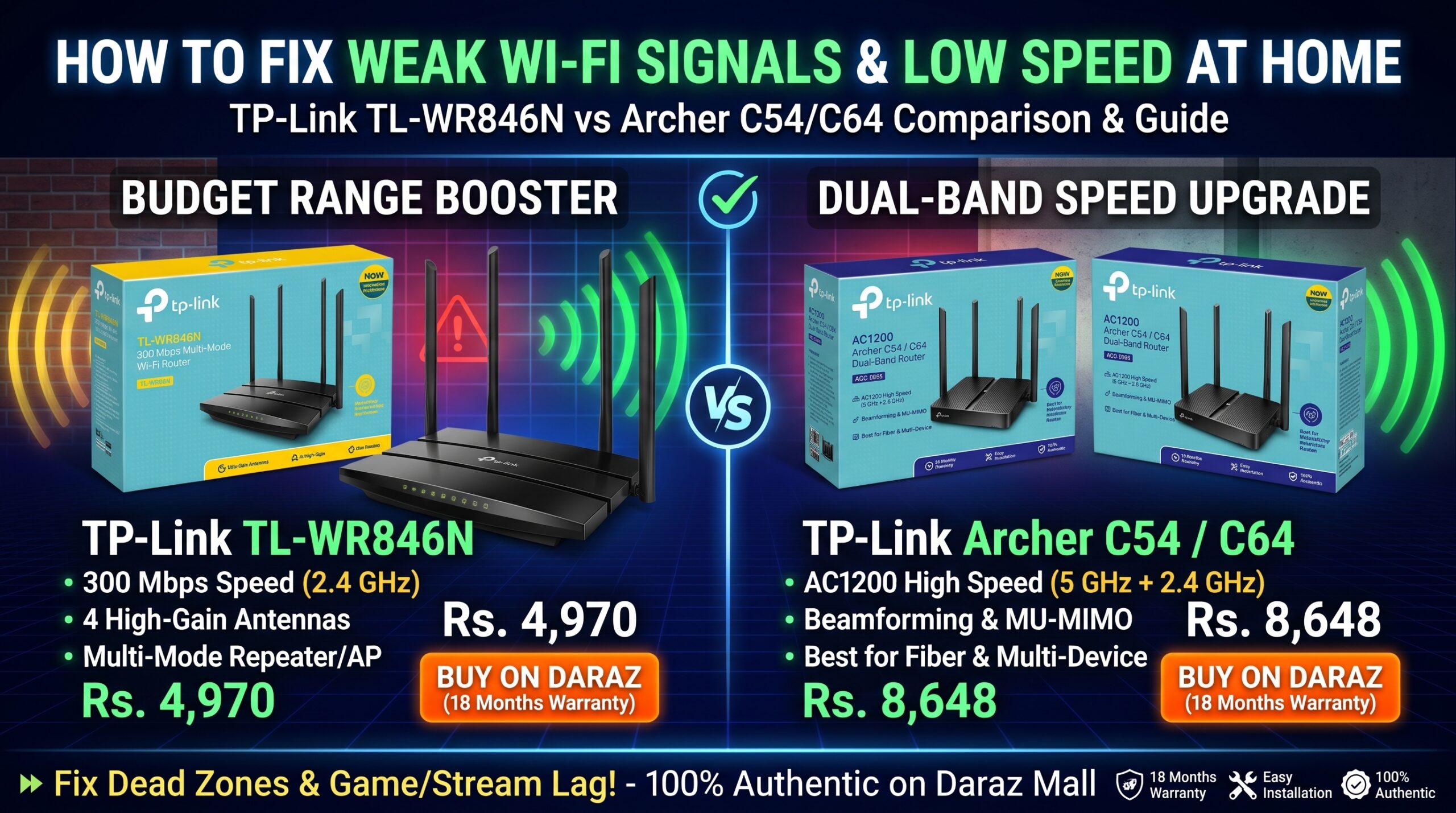

Paying for a fast fiber or 4G internet connection only to experience buffering videos, dropped WhatsApp calls, and dead zones in the next room is one of the most common frustrations in Pakistani households. In most cases, your internet service provider (PTCL Flash Fiber, StormFiber, Nayatel, or a 4G router) is not the actual bottleneck—the default low-power router placed in one corner of the house simply cannot push clean wireless signals through thick brick and concrete walls.
Fixing weak Wi-Fi coverage and sluggish speeds comes down to deploying a dedicated secondary router or upgrading your primary Wi-Fi hardware to match your home’s layout and internet speed. Below is a practical breakdown of why your Wi-Fi slows down and how two popular Daraz Mall routers—the budget TP-Link TL-WR846N and the dual-band TP-Link Archer C54 / C64—solve different sides of the problem.
Why Your Wi-Fi Signal Drops and Speeds Crawl
- Thick Concrete & Brick Walls: Pakistani homes are built with reinforced concrete roofs and solid 9-inch brick walls that absorb standard single-antenna router signals within 15 to 20 feet.
- 2.4 GHz Channel Congestion: In crowded neighborhoods, dozens of neighboring Wi-Fi routers overlap on the older 2.4 GHz frequency band, causing interference and sudden ping spikes even when your phone shows full signal bars.
- No Beamforming Technology: Basic ISP modems broadcast radio waves blindly in every direction instead of focusing signal strength toward your phone or laptop in another room.
TP-Link TL-WR846N vs. TP-Link Archer C54 / C64: Head-to-Head Comparison
| Feature | TP-Link TL-WR846N (Budget Range Extender) | TP-Link Archer C54 / C64 (Dual-Band Speed & Wall Penetration) |
|---|---|---|
| Wi-Fi Standard & Speed | 300 Mbps (Single-Band 2.4 GHz) | AC1200 – 867 Mbps (5 GHz) + 300 Mbps (2.4 GHz) |
| Antennas & Signal Focus | 4x High-Gain External Antennas | 4x High-Gain Antennas + Beamforming Technology |
| Operating Modes | Router, Range Extender, Access Point, WISP | Router, Access Point, Range Extender (MU-MIMO on C64) |
| Best Internet Packages | Up to 30–50 Mbps connections & wide coverage | 50 Mbps to 100+ Mbps Fiber & multi-device streaming |
| Warranty & Daraz Status | 18 Months Brand Warranty (Daraz Mall) | 18 Months Brand Warranty (Daraz Mall) |
| Current Daraz 11.11 Price | Rs. 4,970 (Down from Rs. 10,323) | Rs. 8,648 (Down from Rs. 16,448) |
| Check Live Offer | View TP-Link TL-WR846N on Daraz | View TP-Link Archer C54/C64 on Daraz |
Solution 1: Eliminate Dead Zones on a Budget with the TP-Link TL-WR846N
If your main goal is pushing stable Wi-Fi into a dead zone—such as a far bedroom, ground floor, or neighbor-facing room—without spending heavily, the TP-Link TL-WR846N is built specifically for range extension on a budget.
- Four External High-Gain Antennas: Unlike small single-antenna repeaters that lose half their signal strength, the TL-WR846N uses four dedicated external antennas to maintain a steadier 2.4 GHz link across wider rooms and hallways.
- Multi-Mode Flexibility (Repeater + Access Point): You can place it halfway between your main router and your dead zone in Range Extender (Repeater) Mode without running wires, or connect it via an Ethernet cable in Access Point Mode for zero speed loss.
- Daraz Deal Highlight: Currently listed at Rs. 4,970 (Rs. 5,353 off regular retail) with Free Delivery and an 18-month official warranty. Grab the TP-Link TL-WR846N deal on Daraz here.
Solution 2: Fix Slow Speeds & Lag with the TP-Link Archer C54 / C64
If you pay for a fast fiber package (50 Mbps or higher) or have multiple family members watching 4K YouTube, attending Zoom classes, and gaming at the same time, a single-band 2.4 GHz router will still feel slow due to wireless interference. Upgrading to the TP-Link Archer C54 / C64 AC1200 Dual-Band Router solves both speed bottlenecks and signal drop-offs.
- Dual-Band 5 GHz + 2.4 GHz Freedom: The clean 5 GHz band (up to 867 Mbps) bypasses neighborhood Wi-Fi interference to deliver full fiber speeds in nearby rooms, while the 2.4 GHz band (300 Mbps) handles long-range coverage through walls.
- Beamforming Signal Targeting: Instead of broadcasting weak signals evenly into empty space, Beamforming detects where your phone or laptop is located and concentrates wireless power directly toward your device.
- MU-MIMO Multi-Device Efficiency: When five or six phones connect simultaneously, MU-MIMO prevents slow older devices from dragging down the speed of newer smartphones.
- Daraz Deal Highlight: Currently discounted by Rs. 7,800 down to Rs. 8,648 on Daraz Mall with an 18-month brand warranty. Check the TP-Link Archer C54 / C64 offer on Daraz here.
3 Quick Placement Tips to Maximize Speed Immediately
- Elevate the Router: Place your router at least 5 to 6 feet off the floor on a shelf or wall mount—signals travel downward and outward much cleaner than from floor level behind furniture.
- Angle Antennas Properly: Keep two antennas pointing straight up vertically and angle the other two slightly outward (around 45 degrees) to cover both horizontal rooms and upper/lower floors.
- Use Ethernet Backhaul When Possible: If you are connecting either router as a secondary Access Point in another room, running a single Cat6 Ethernet cable from your primary modem delivers 100% of your paid internet speed with zero wireless repeater loss.
Disclosure: This post contains affiliate links. If you purchase through these links, we may earn a small commission at no extra cost to you.
Related Blogs
-
 Nov 18, 2026
GTA 6 Cheat Codes:…
Grand Theft Auto VI has finally arrived, and with it comes the return of the iconic GTA cheat codes. However, Rockstar Games has introduced a..
-
 Nov 15, 2026
TP-Link Archer C6 AC1200…
Upgrading to a high-speed fiber internet connection like PTCL Flash Fiber, StormFiber, or Transworld requires a router capable of pushing full bandwidth without bottlenecks. Standard..
-
 Jun 15, 2026
Best Enterprise Cloud SIEM…
In distributed enterprise cloud environments, modern corporate infrastructure platforms generate millions of data logs every single second. Everything from user login attempts and API database..
-
 Jun 13, 2026
Best Enterprise SOAR Platforms…
In contemporary corporate computing environments, enterprise Security Operations Centers (SOCs) face thousands of security alerts every single hour. Manually investigating every software flag, tracking firewall..
-
 Jun 1, 2026
Best Enterprise Database Automation…
As enterprise applications scale globally, managing backend data systems manually becomes an operational liability. Database Administrators (DBAs) can no longer afford to execute raw SQL..
-
 May 31, 2026
Top Cloud Infrastructure Automation…
Manually deploying corporate servers, configuring virtual networks, and managing database storage spaces through standard graphical dashboards is a major operational bottleneck for modern enterprise teams...
-
 May 30, 2026
Best Enterprise Endpoint Security…
With corporate teams working across distributed hybrid environments, the traditional corporate network perimeter no longer exists. Every laptop, smartphone, and cloud-connected server acts as an..
-
 May 29, 2026
Best Enterprise Network Monitoring…
Maintaining 100% uptime across complex corporate data centers, remote office branches, and cloud storage systems requires continuous visibility into your local infrastructure. IT administrators cannot..
-
May 28, 2026
How to Set Up…
Allowing house guests, clients, or delivery personnel direct access to your primary home or office Wi-Fi network introduces significant security vulnerabilities. When a device logs..
-
 May 26, 2026
Cloud Backup vs External…
Safeguarding critical professional data against unexpected system crashes, hardware failures, or modern cybersecurity threats requires a robust, redundant backup strategy. Relying strictly on your computer's..
-
 May 25, 2026
Matter vs Zigbee: Best…
Building an efficient, responsive, and seamless smart home network requires looking past simple brand names and investigating the underlying communication protocols that connect your devices...
-
 May 24, 2026
Best AI Video Generators…
The digital media landscape is undergoing an unprecedented shift. In 2026, content creators, independent filmmakers, and marketing agencies are no longer entirely dependent on massive..
-
 May 20, 2026
Top 5 Legitimate Global…
The landscape of global employment has shifted permanently. In 2026, landing a flexible, work-from-home role no longer requires living in a major Western tech hub..
-
 May 20, 2026
UK Health and Care…
The United Kingdom remains one of the premier destinations for international healthcare professionals seeking stable, well-paying careers abroad. Under the points-based immigration system, the Health..
-
 Nov 29, 2024
Aftermath of US Elections…
The aftermath of the 2024 U.S. election, in which Donald Trump was re-elected, has sparked widespread political and public discourse. Key themes include his cabinet..
-
 Nov 17, 2024
The Smog Plague in…
Smog has become a significant environmental and health issue in Pakistan, particularly in major cities like Lahore. The primary reasons for smog in Pakistan include..
-
 Nov 17, 2024
Mike Tyson vs. Jake…
The highly anticipated boxing match between Mike Tyson and Jake Paul took place on November 15, 2024, at AT&T Stadium in Arlington, Texas. This event,..